How It Works / Your Quick-Start Guide

Getting Started
With Hustle Points

You'll be ready before the next practice or game.

Your first conversation in four steps

01

Download &
Create Your Account

Download Hustle Points and create your parent account.
02
Add Child Save Child

Add Your Child

Add your child's name and sport. Add additional children if needed.

03
Create Reward Save Reward

Create a Reward

Choose something your child will actually be excited to work toward.

04
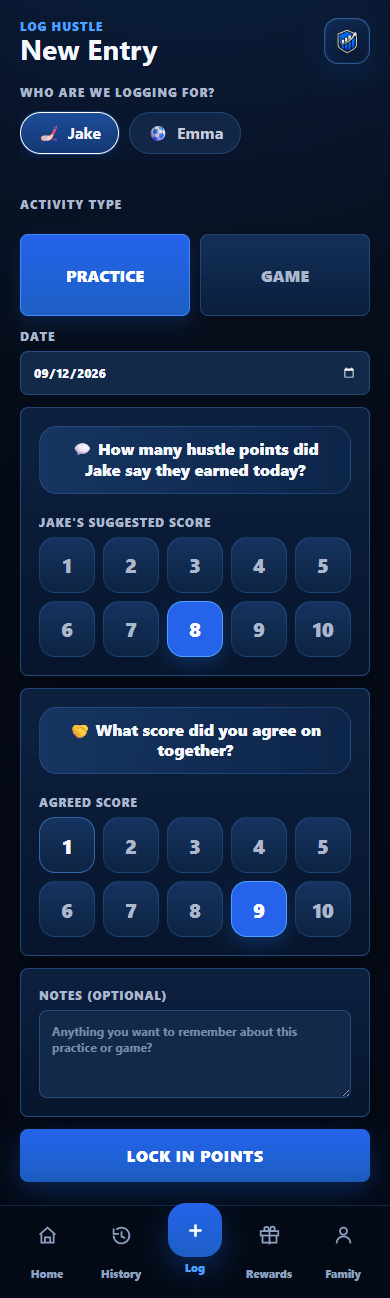
Hustle Points New Entry screen showing suggested and agreed score selection
Actual app screen

Start the Conversation

Tell your child you're going to start tracking their hustle. After the next practice or game, ask:

“How many Hustle Points do you think you earned today?”

Let them answer first. Talk about what you both noticed, agree on the score, and log the first session.

TalkAgreeLog

That's it.

Your first Hustle Points conversation is complete.

Keep asking. Keep listening. Let the habit build.
Optional

Playing with a Hustle Points team?

Enter your team code to connect your child and receive recognition from their coach.

You can get your team code from your coach or association. You can still use Hustle Points independently without a team.
HPSTRONG Join Team

Ready to keep going?

Four simple steps. One better conversation.

How Hustle Points Works Back to the homepage